How to edit Ricoh GR RAW (DNG) photos on iPhone
Updated November 27, 2026
Shoot RAW on a GR and open the DNG on your phone, and it often looks flatter and duller than the JPEG the camera made. Nothing is wrong. The JPEG has the camera’s processing baked in. The RAW is the sensor data before any of that, which is exactly why it’s worth editing.
Why the RAW looks different from the JPEG
When the GR saves a JPEG, it applies its Image Control (Standard, Positive Film, Negative Film and so on), its contrast and sharpening. A RAW file keeps that out. Most editors then show it with their own generic rendering, which rarely looks like your camera.
That’s why the first step in any RAW edit is choosing how the file is rendered, before you touch a slider.
Your options on iPhone
The Photos app opens DNG files and handles quick fixes, but it renders every camera the same way and has no camera looks.
General RAW editors such as Lightroom Mobile have deep tools and camera profiles, and usually an account and subscription.
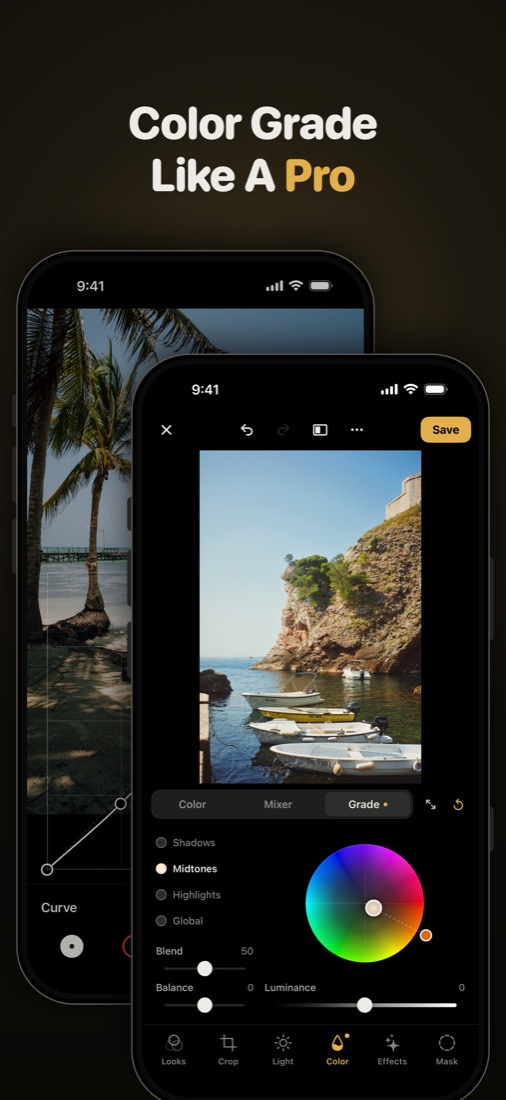
GR Flow is made for the GR. It develops the RAW with looks fitted to the GR III and GR IIIx, so a shot opens looking like your camera, and it gives you curves, HSL, color grading, masks and film effects on top. It’s a one-time purchase with no account.
A simple editing order
1. Pick a look. Start from a camera look like Positive Film or Standard, so you’re refining a good starting point instead of building one.
2. Set exposure and white balance. RAW lets you move these after the fact without the banding you’d get from a JPEG.
3. Recover highlights, lift shadows. Bright skies and dark interiors are where RAW earns its keep.
4. Shape the mood. A gentle curve, a little color grading, then grain if you want a film feel.
5. Save a preset. Once you like it, save it and apply it to the rest of the roll so a set of photos looks consistent.
Exporting
Save as JPEG for sharing anywhere, or HEIC for smaller files at the same quality on Apple devices. Your original RAW stays untouched, so you can always come back to it.